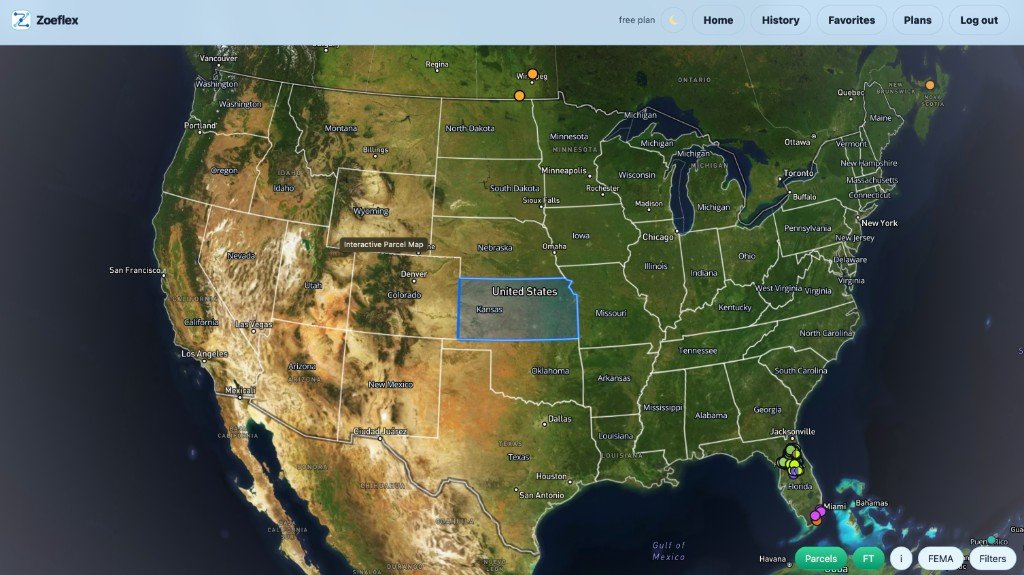
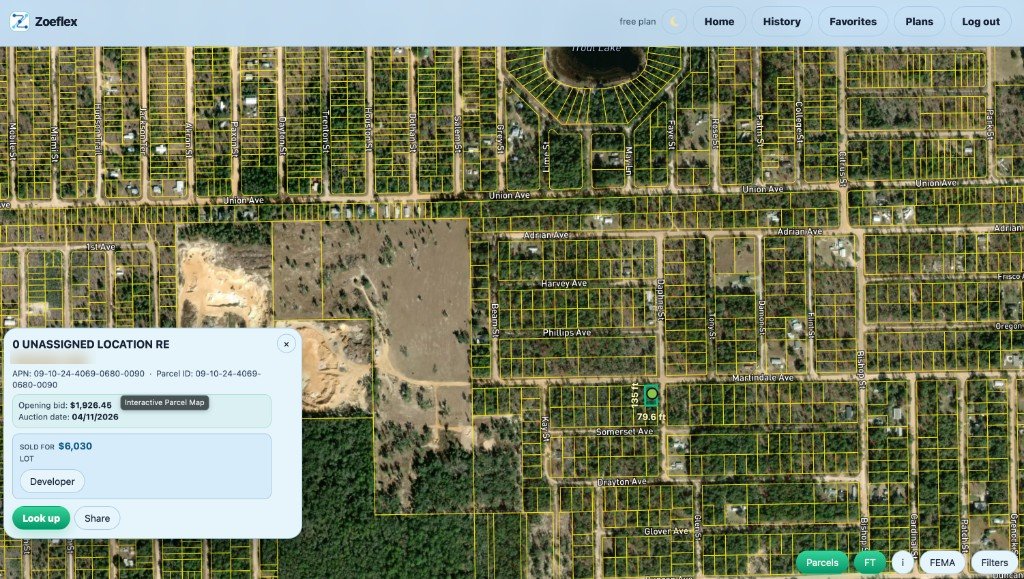
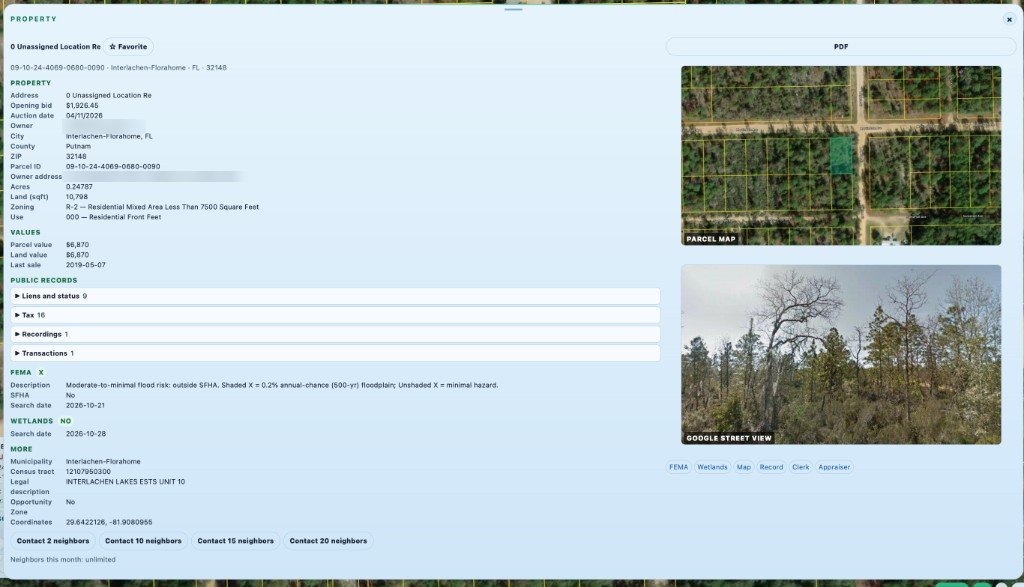
Parcel map of the entire United StatesZoom in to any lot and open its detailsFull property report with FEMA, street view and PDF
Mobile app, Chrome extension, and website
Research any U.S. property, owner and flood zone in one place
Look up a parcel by ID, address or name. See it on a map, check FEMA flood risk, pull owner contact details and export your results.
One subscription, three places
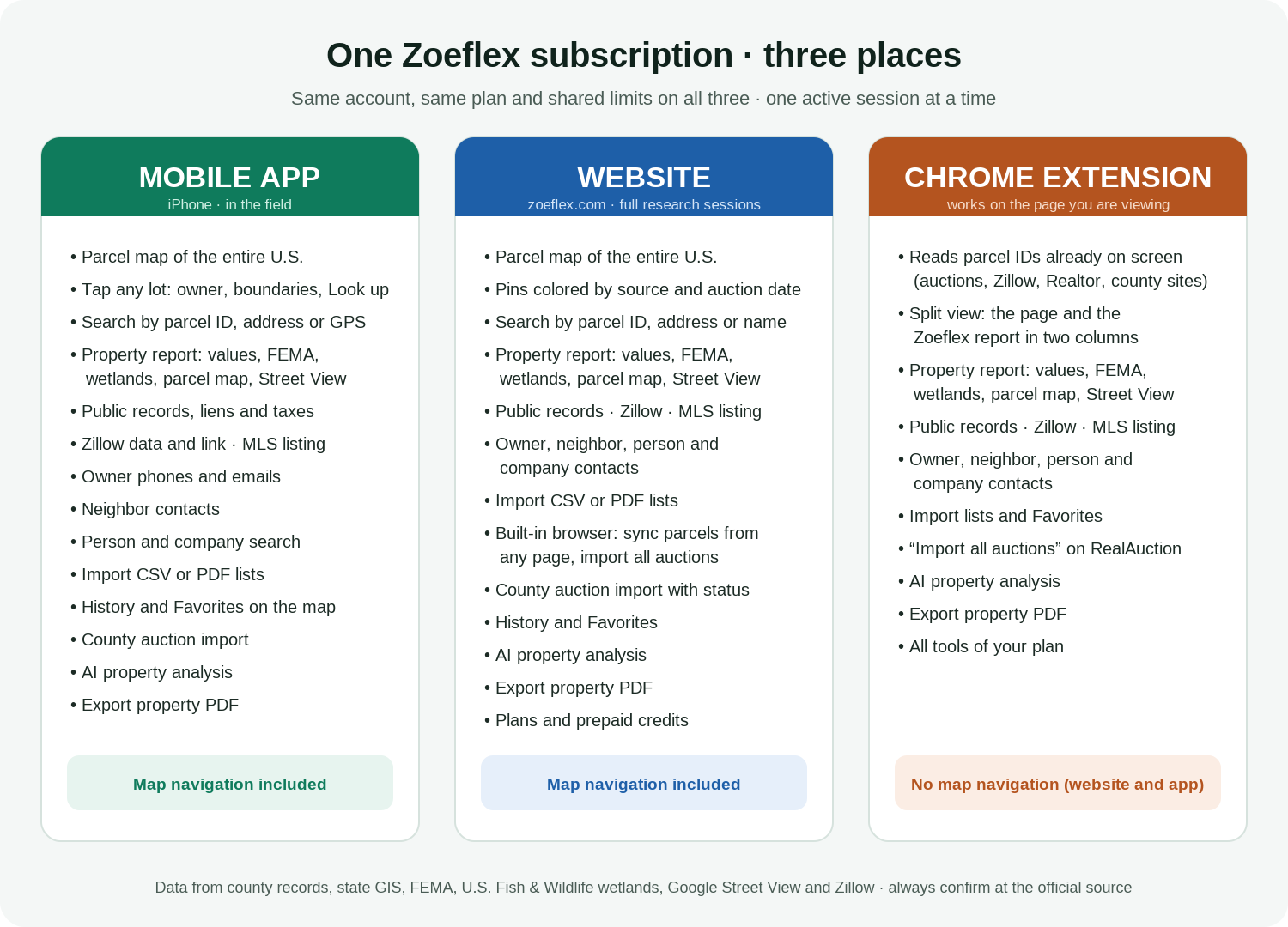
Mobile app, Chrome extension and website
One Zoeflex subscription gives you the website, the mobile app and the Chrome extension at the same time. Use the website for full research sessions, the mobile app in the field, and the Chrome extension on the page you are already viewing.
Same login, same plan and the same monthly limits, shared across all three
One active session at a time: signing in on another device ends the previous session
The extension reads the parcel IDs on your screen and opens the report beside the page, in two columns
Importing, favorites and every tool of your plan work in all three. Map navigation is on the website and the app
Data from county records, state GIS, FEMA, U.S. Fish & Wildlife wetlands, Google Street View and Zillow, with links to confirm each detail at the official source
What each one includes
Parcel map
Parcel map of the entire United States
Start with a nationwide view and zoom down to a single lot. Parcel lines load as you move the map, and a tap on any lot opens its address, owner and auction details.
Parcel boundaries with approximate lot dimensions
Tap a lot to see its address, owner and property data
Look up a lot for the full report, or share it with one tap
Layers for parcels, feet and FEMA right on the map
Parcels up close, with the lot sheet open
FEMA
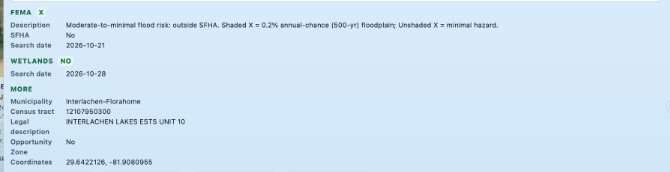
FEMA flood zone on every property
Every property report shows its FEMA flood zone with a plain-language description, so you can read the risk at a glance before you spend more time on a lot. Wetlands status sits right below it.
Flood zone and risk description, for example Zone X
Special Flood Hazard Area (SFHA), yes or no
Wetlands check, with the date of the search
Turn on the FEMA layer on the map to see the zones around the parcel
FEMA flood zone and wetlands in the property report
Export PDF and CSV
Export PDF and CSV
Turn your research into files you can share or keep. Save a printable property report as PDF and export your results to CSV. You can also upload a CSV or PDF list to research many properties at once. Limits depend on your plan.
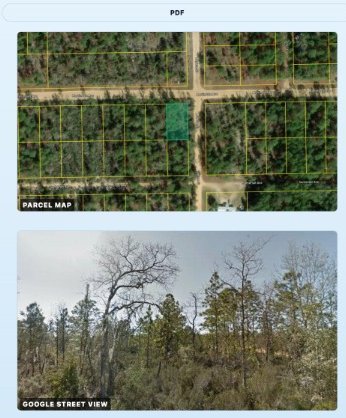
PDF report for any property you research
CSV export of your results
Upload a CSV or PDF list to research many properties in one go
PDF button, parcel map and street view
Person and company data
Person and company data, with phone and email
Find who is behind a property. Search by person or company name to see contact details such as phone numbers and email addresses, plus company records and members. From any property you can also pull the same details for its neighbors.
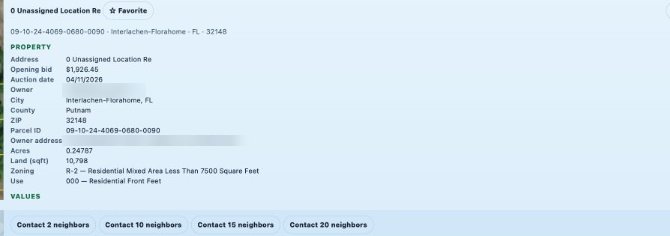
Owner lookup right from the property record
Person and company search with phone and email
Contact neighbors of a property in batches of 2, 10, 15 or 20
Contact data comes from public records and data providers and may be incomplete. Verify it, and use it only as the law allows. See our Privacy Policy.
Owner lookup and neighbor contacts
List leads
List leads
Build lead lists from your research. Every property you look up is saved to your History, the best ones go to Favorites, and each one comes with its owner, location, values and contact details. Export the whole list to CSV and keep working it in your own tools.
Save every lookup to History and star the best ones as Favorites
Add owner and neighbor phone and email to each lead
Export the list to CSV, or share a property as PDF
If you contact leads, follow the TCPA, Do Not Call and CAN-SPAM rules that apply to you.
One record per lead: owner, values, FEMA, maps and contacts
History and favorites
A history of everything you research
Every property you look up is saved to your History automatically. Type a parcel ID or an address, or collect one from the page you are viewing with the Chrome extension, and it is kept together with the site it came from, so you always know where a lead started.
1
Collect
A parcel ID or an address, typed in or captured from the page you are browsing.
2
History
Saved with its source and grouped in folders by source and place.
3
Favorites
Star the properties worth a second look to build your own Favorites list.
4
Review
See your history and favorites as pins on the map, or open them as a list.
Sources it keeps track ofRealAuctionRealForecloseRealTaxDeedAuction.comHubzuand more
You stay in control: remove a record, or a whole folder, whenever you no longer need it.
Plans
Choose your plan
Start free and upgrade when you need more searches, more speed and more data. Cancel any time.
Start free
Free
$0
Manual research by parcel ID, address or person, with property, valuation, FEMA and parcel map data. Includes 20 properties a day, shared between map Look up, manual search and the Chrome extension. Owner, person, company and neighbor lookups are limited. AI analysis and PDF or CSV import are locked. One active device.
20 properties per day: map Look up, manual search and the extension share one daily limit
Manual research by parcel ID, address or person
Property, valuation, FEMA and parcel map data
Owner contact for that property: 1 per month
2 person searches and 2 company searches per month
Up to 4 neighbors per month. Only neighbors that come back count
Low-priority queued processing
AI analyses locked
PDF and CSV import locked
One active device
Monthly · Cancel anytime
Pro
$10 per month
Property and person research with medium-speed processing, FEMA data and aerial parcel maps. Includes 500 map Look ups a day, 10 person searches, 10 company searches and 10 neighbors a month, 1,000 manual and imported properties a month, 100 AI analyses a month, and 50 PDF or CSV files a month. A PDF is read from the first page. A CSV is read from the first 50 rows. One active device. Billed monthly at $10. Cancel any time.
Everything in Free
500 map Look up properties per day
Owner contact for that property: 10 per month
10 person searches and 10 company searches per month
10 neighbors per month. Only neighbors that come back count
Medium-speed processing
100 new AI analyses per month
1,000 manual and imported properties per month. Map Look up stays separate
50 PDF or CSV files per month
One-page PDF, or the first 50 rows of a CSV
One active device
Best performance
Pro Plus
$20 per month
High-volume property and person research with maximum processing priority, FEMA data and aerial parcel maps. Includes 1,000 map Look ups a day, 25 person searches, 25 company searches and 30 neighbors a month, 2,500 manual and imported properties a month, AI analyses under fair use, and 500 PDF or CSV files a month. A PDF is read from the first page. A CSV is read from the first 50 rows. One active device. Billed monthly at $20. Cancel any time.
Everything in Pro
1,000 map Look up properties per day
Owner contact for that property: 25 per month
25 person searches and 25 company searches per month
30 neighbors per month. Only neighbors that come back count
Maximum processing priority
Unlimited AI analyses under fair use
2,500 manual and imported properties per month. Map Look up stays separate
500 PDF or CSV files per month
One-page PDF, or the first 50 rows of a CSV
One active device
Sign in to continue
Use the same account in the Zoeflex extension.
Billing terms
Subscriptions renew monthly until cancelled. One subscription gives access to the mobile app, the Chrome extension and this website, with the same limits shared across all three and one active session at a time. Monthly allowances renew on your subscription renewal date each month (Free accounts: on the day of the month the account was created); map Look ups reset daily. When you reach a limit you can keep going with prepaid credits: 1 credit = $1, used after your plan allowance, with no expiration date. You may cancel at any time and retain paid access through the end of the current billing period. Monthly charges and credits are non-refundable except where required by applicable law. Zoeflex may refuse, block or suspend service; in that case the unused days of the month and any unused credits are refunded within 5 days, as described in the Terms of Use. Zoe Flex LLC, not Google, is the seller. Payments are securely processed by Stripe.
Information is gathered from public records and third-party sources and may be incomplete or out of date. Always confirm it at the official source. You are responsible for using people and contact information in compliance with all applicable U.S. laws. See the Terms of Use.
 Zoeflex